Hot News:
   

Mit Unterstützung durch:

  Foren auf CAD.de
  Creo Elements/Direct
  Material properties assignment in Sheet Metal

Antwort erstellen  Neues Thema erstellen
CAD.de Login | Logout | Profil | Profil bearbeiten | Registrieren | Voreinstellungen | Hilfe | Suchen

Darstellung des Themas zum Ausdrucken. Bitte dann die Druckfunktion des Browsers verwenden. | Suche nach Beiträgen nächster neuer Beitrag | nächster älterer Beitrag
  
BOM Assistant für Stücklistenerstellung , eine App
Autor Thema:  Material properties assignment in Sheet Metal (267 / mal gelesen)
mike100X
Mitglied


Sehen Sie sich das Profil von mike100X an!   Senden Sie eine Private Message an mike100X  Schreiben Sie einen Gästebucheintrag für mike100X

Beiträge: 4
Registriert: 12.09.2026

Creo Elements/Direct Modeling 20.6.2.0

erstellt am: 16. Sep. 2026 16:22    Editieren oder löschen Sie diesen Beitrag!  <-- editieren / zitieren -->   Antwort mit Zitat in Fett Antwort mit kursivem Zitat    Unities abgeben: 1 Unity (wenig hilfreich, aber dennoch)2 Unities3 Unities4 Unities5 Unities6 Unities7 Unities8 Unities9 Unities10 Unities


RBT_TEST.lsp


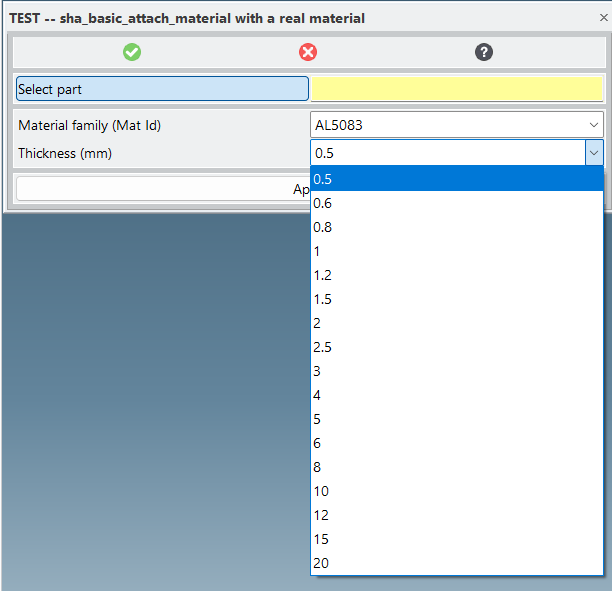
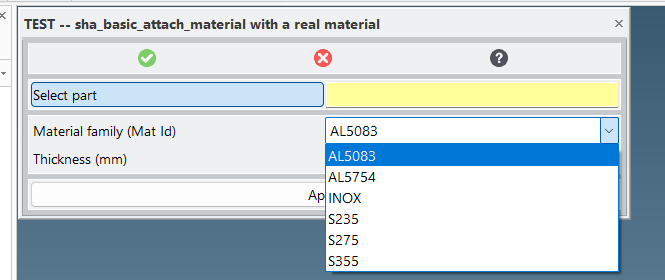
dialog2.png


dialog1.png

 
Hi,
We have many materials defined in Creo . We built a custom dialog to pick family and thickness before applying them to a part (screenshots 1 and 2: the cascading dropdowns with our real data), based on the sheet_part_select.lsp script from this same forum (thread "Blech Material / Blechstärke zuweisen": https://ww3.cad.de/foren/ubb/Forum29/HTML/004924.shtml, with the oli:: package fix mentioned there).

Thickness is applied correctly and persists.

But material is not: whatever value we pass to :material (a literal string or a real code from our own database), the part — and the whole session's material list for new parts — always falls back to a generic default, until Creo is restarted.

Code attached (the block that doesn't work as expected is marked). Any idea what's wrong, or what the correct syntax should be?

We don't have much experience with Lisp in Creo, so any pointer, however basic, is appreciated.
Thanks!

------------------
miquel

Eine Antwort auf diesen Beitrag verfassen (mit Zitat/Zitat des Beitrags) IP

der_Wolfgang
Moderator
Tastenhauer


Sehen Sie sich das Profil von der_Wolfgang an!   Senden Sie eine Private Message an der_Wolfgang  Schreiben Sie einen Gästebucheintrag für der_Wolfgang

Beiträge: 2474
Registriert: 3.20.

● PE60+80+90@home
● W10 Pro Bld19045.6466
● Drafting V17~V20.6@job
● Modeling V17~V20.7.2@job
● Windchill 12.1.2.8@job
● UWGM Client 13.1.0.1@job
● Taschenrechner
● brain 6.4
● Stift+Zettel V8.42

erstellt am: 16. Sep. 2026 23:30    Editieren oder löschen Sie diesen Beitrag!  <-- editieren / zitieren -->   Antwort mit Zitat in Fett Antwort mit kursivem Zitat    Unities abgeben: 1 Unity (wenig hilfreich, aber dennoch)2 Unities3 Unities4 Unities5 Unities6 Unities7 Unities8 Unities9 Unities10 Unities Nur für mike100X 10 Unities + Antwort hilfreich

First of all: welcome on CAD.DE Miquel   

When reading your post I thought somehow the UI of your dialog does not do what you expect and is loosing, e.g. it's ranges.

But based on the part of the code you marked (!!! great idea and thanks for that !!!) it looks the dialog's UI is fine, but attaching the material is somehow failing.


Basically you are using 'oli::sha_basic_attach_material' .   How to know the correct syntax?

Pointer1: use the online reference.  Start Modeling and your Modules. Type into the Modeling command line:

Code:
(oli::sd-online-reference)
=> there will be new button in the toolbox showing a on-the-fly-generated HTML page with a lot of details on dialogs.
if you like to use your prefered browser look in your %TEMP% dir for the file 'online_reference.html'. The file still exist, even when ending your modeling session.

'sha_basic_attach_material' is pointing to a subaction 'sha_attach_material_subdialog'. That one does the real job.

Pointer2: TRACE the function you like to 'debug'. Best: start Modeling with the start-parameter '-v' to open the console directly. After starting your modules, type into the Modeling command line::

Code:
(oli::sd-show-console-window)  ;; if not started with '-v'
(trace
  oli::sha_basic_attach_material
  oli::sha_attach_material_subdialog)

...before the action you like to do. That way you can watch which kind of Parameters a function gets as input and what it does return. Use your own add on with just one part selected.

e.g.

Code:
(trace oli:sd-num-to-string)
(oli:sd-num-to-string pi)
(oli:sd-num-to-string (/ 1 7.0))
(untrace oli:sd-num-to-string)
Output will look like
Code:
  1> (OLI:SD-NUM-TO-STRING 3.1415926535897931)
  <1 (OLI:SD-NUM-TO-STRING "3.141593")

Pointer3: by tracing you can see what the actions get. What does happen when you call it directly, or e.g. via copy and paste into the command line?

Code:
(oli::sha_basic_attach_material :sheet_part (oli:sd-inq-curr-part) :yes
  :material "AL083" :yes :thickness 2.5 :yes)

I am quite in doubt about all the :YES in your code.  They are normally for confirmations popping up.
Remove those one by one.

The material does not have a check at all (and therefore no confirmation). I would shoot on that one.

Code:
(oli::sha_basic_attach_material :sheet_part (oli:sd-inq-curr-part) :yes
  :material "AL083" :thickness 2.5 :yes)

Pointer4: sd-call-cmds does have some good options! Specially for error handling!

We recently have had that topic => https://ww3.cad.de/foren/ubb/Forum29/HTML/004994.shtml#000003 Have a look also to the demo-case I created https://ww3.cad.de/foren/ubb/uploads/der_Wolfgang/cadde-29-004994.lsp.
In the failure case the error is inquired with '(sd-inq-error-obj :all)' and printed to console.

means: extend your sd-call-cmds construct:

Code:

(sd-call-cmds (oli::sha_basic_attach_material :sheet_part part :yes
                                              :material test_real_code :yes
                                              :thickness test_thickness :yes
                )         
  :failure (progn  ;; Achtung! mal ohne quote hier!                         ;; new code
               (pprint "my-risky-function call: HOUSTEN we have a Problem") ;; new code
               (format T "~&~{~%* [[~S]]~%~%~}" (sd-inq-error-obj :all))    ;; new code
               (setq call-result :housten-there-is-a-problem)               ;; new code
               :bad                                                         ;; new code
               )                                                            ;; new code
)

Please help:
Zitat:
Original erstellt von mike100X:
the part — and the whole session's material list for new parts — always falls back to a generic default, until Creo is restarted.

That's the part I hardly understand.  "the whole session's material list for new parts"
Sorry I don't get it . Explain! Please use six short clear sentences instead of one long one.
Where it the list, what kind of default, how does it look like?

BTW: if, for understanding the problem the logical table's content is needed. Create a small one with just 3 hardcoded lines inside. A display-table is not needed at all (for that).

==================================================

and for increasing your LISP skills here is a variant of one of your local functions:

Code:
(rbt_test_families ()
  (if (sd-logical-table-p "COMPANY-SHEET_METALS")
    (let (all-families one-fam)
      (dotimes (row-num (sd-get-logical-table-number-of-rows "COMPANY-SHEET_METALS"))
        (when (setq one-fam (getf (sd-read-logical-table-row "COMPANY-SHEET_METALS" :row row-num) :MAT_ID))
          (pushnew one-fam all-families :test 'equal) ;; test if its already in the list, if not add it
        )
      )
      (sort all-families #'string-lessp)
    )
    nil
  )
)
at least the 'pushnew' you might wanna take over


------------------
● Firefox ESR ● Java Forum Stuttgart JUGS ● OSD Hilfeseite (de) / help page (en) ● NotePad++ ● BuFDi ●

Eine Antwort auf diesen Beitrag verfassen (mit Zitat/Zitat des Beitrags) IP

mike100X
Mitglied


Sehen Sie sich das Profil von mike100X an!   Senden Sie eine Private Message an mike100X  Schreiben Sie einen Gästebucheintrag für mike100X

Beiträge: 4
Registriert: 12.09.2026

Creo Elements/Direct Modeling 20.6.2.0

erstellt am: 20. Sep. 2026 23:04    Editieren oder löschen Sie diesen Beitrag!  <-- editieren / zitieren -->   Antwort mit Zitat in Fett Antwort mit kursivem Zitat    Unities abgeben: 1 Unity (wenig hilfreich, aber dennoch)2 Unities3 Unities4 Unities5 Unities6 Unities7 Unities8 Unities9 Unities10 Unities


demo_attach_material.lsp

 
Hello Wolfgang

Thanks for the fast and detailed reply — those 4 pointers (online reference, trace, bare call, sd-call-cmds with :failure) are exactly the path we followed to sort this out.

Regarding your question about the material list, in six short sentences:

That list is the material dropdown shown when creating a new part, within the same Creo session.
Normally it shows every real material code from our own material table.
After calling sha_basic_attach_material once (with any material, even a made-up one), that dropdown for new parts starts showing only one generic material.
Our real materials disappear from that list until Creo is fully restarted.
Restarting brings the list back to normal.
Using the tool again breaks the list again — it's a session-only effect, not something written to disk.

How we found the fix: tracing sha_basic_attach_material and sha_attach_material_subdialog showed that "basic" explicitly passes :MATERIAL-VISIBLE NIL to the subaction — it hides the material field on purpose, no matter what value is passed. Switching to the full sha_attach_material (no "basic"), the trace showed it does NOT pass that flag — the field stays enabled and the material is actually applied. Tested on 5 parts plus multi-selection, no crash, and the broken-list side effect is gone too.

Attached is a clean demo file with the confirmed working mechanism (simple dialog: parts + material + thickness).

One more thing — we're trying something similar but for modifying the radius/die of an already-existing bend (sha_modify_bend). In our bending table, a single computed radius can have more than one valid piston/die combination (not just one). We've tried passing :BEND_TOOL_KEY, :TOOL_KEY_PLIST, and both together, always alongside :RADIUS/:MATERIAL_PLIST/:THICKNESS — in every case the radius does get applied, but the piston/die combination recalculates on its own and always falls back to the same default, ignoring whatever tool-key we pass, even when other valid combinations genuinely exist for that same radius. Does anything similar to :MATERIAL-VISIBLE come to mind, or any other way to force that selection?

------------------
miquel

Eine Antwort auf diesen Beitrag verfassen (mit Zitat/Zitat des Beitrags) IP

achim96
Mitglied
Konstrukteur


Sehen Sie sich das Profil von achim96 an!   Senden Sie eine Private Message an achim96  Schreiben Sie einen Gästebucheintrag für achim96

Beiträge: 146
Registriert: 08.07.2013

Creo Elements / Direct Modeling, V20.7.1.1
Model Manager V20.7.1.1
Part Library

erstellt am: 21. Sep. 2026 14:50    Editieren oder löschen Sie diesen Beitrag!  <-- editieren / zitieren -->   Antwort mit Zitat in Fett Antwort mit kursivem Zitat    Unities abgeben: 1 Unity (wenig hilfreich, aber dennoch)2 Unities3 Unities4 Unities5 Unities6 Unities7 Unities8 Unities9 Unities10 Unities Nur für mike100X 10 Unities + Antwort hilfreich

Zitat:
Original erstellt von mike100X:

One more thing — we're trying something similar but for modifying the radius/die of an already-existing bend (sha_modify_bend). In our bending table, a single computed radius can have more than one valid piston/die combination (not just one). We've tried passing :BEND_TOOL_KEY, :TOOL_KEY_PLIST, and both together, always alongside :RADIUS/:MATERIAL_PLIST/:THICKNESS — in every case the radius does get applied, but the piston/die combination recalculates on its own and always falls back to the same default, ignoring whatever tool-key we pass, even when other valid combinations genuinely exist for that same radius. Does anything similar to :MATERIAL-VISIBLE come to mind, or any other way to force that selection?

[/B]


Die Biegetabelle wird immer nur den ersten Eintrag der Tabelle mit dem entsprechenden Radius nehmen. Du musst die Bedingung zur Unterscheidung erweitern. Im Shop muss eine Bedingung hinzugefügt werden wie zum Beispiel:

(sha-define-shop-table......
:KEY                (  IE_WIDTH :PISTON_RAD )

Sowohl die Matrizenweite ( IE_WIDTH ) als auch der Werkzeugradius (:PISTON_RAD) müssen eine gemeinsame Kombination bilden, damit sie sich von anderen Werkzeugkombinationen unterscheiden können.

------------------
freundliche Grüße
Achim

Eine Antwort auf diesen Beitrag verfassen (mit Zitat/Zitat des Beitrags) IP

mike100X
Mitglied


Sehen Sie sich das Profil von mike100X an!   Senden Sie eine Private Message an mike100X  Schreiben Sie einen Gästebucheintrag für mike100X

Beiträge: 4
Registriert: 12.09.2026

Creo Elements/Direct Modeling 20.6.2.0

erstellt am: 21. Sep. 2026 23:22    Editieren oder löschen Sie diesen Beitrag!  <-- editieren / zitieren -->   Antwort mit Zitat in Fett Antwort mit kursivem Zitat    Unities abgeben: 1 Unity (wenig hilfreich, aber dennoch)2 Unities3 Unities4 Unities5 Unities6 Unities7 Unities8 Unities9 Unities10 Unities

Zitat:
Original erstellt von achim96:

Die Biegetabelle wird immer nur den ersten Eintrag der Tabelle mit dem entsprechenden Radius nehmen. Du musst die Bedingung zur Unterscheidung erweitern. Im Shop muss eine Bedingung hinzugefügt werden wie zum Beispiel:

(sha-define-shop-table......
:KEY                 (   IE_WIDTH :PISTON_RAD )

Sowohl die Matrizenweite (  IE_WIDTH ) als auch der Werkzeugradius (:PISTON_RAD) müssen eine gemeinsame Kombination bilden, damit sie sich von anderen Werkzeugkombinationen unterscheiden können.


Thanks, Achim, for the :KEY idea — we put it to a real test, so here's what we found.

We built a parallel test bend table (air_bending_test, isolated, without touching the real one), with just 3 rows and :KEY ( IE_WIDTH :PISTON_RAD) instead of (:PISTON_GROUP  IE_GROUP). With that table, picking a specific piston among several ambiguous options did work.

But before assuming that was the cause, we ran the control test on the real table without touching its :KEY — and the native dialog also respected the choice there just fine. So the :KEY wasn't the actual cause.

The real problem is somewhere else: we've tried replicating that same selection via Lisp by calling sha_modify_bend with :BEND_TOOL_KEY/:TOOL_KEY_PLIST, and it always ignores it. To rule out that we were calling the function wrong, we traced sha_modify_bend  and repeated the full native flow (picking a candidate from that window and applying it). sha_modify_bend never shows up in the console, not even once — so that specific step doesn't go through that function at all.

Do you know which function/subaction actually applies the selection in that candidate window? We suspect it might be a pattern similar to sha_attach_material_subdialog that we ran into with the material topic, but this time we don't have any name to go on.

------------------
Miquel

Eine Antwort auf diesen Beitrag verfassen (mit Zitat/Zitat des Beitrags) IP

achim96
Mitglied
Konstrukteur


Sehen Sie sich das Profil von achim96 an!   Senden Sie eine Private Message an achim96  Schreiben Sie einen Gästebucheintrag für achim96

Beiträge: 146
Registriert: 08.07.2013

Creo Elements / Direct Modeling, V20.7.1.1
Model Manager V20.7.1.1
Part Library

erstellt am: 22. Sep. 2026 12:14    Editieren oder löschen Sie diesen Beitrag!  <-- editieren / zitieren -->   Antwort mit Zitat in Fett Antwort mit kursivem Zitat    Unities abgeben: 1 Unity (wenig hilfreich, aber dennoch)2 Unities3 Unities4 Unities5 Unities6 Unities7 Unities8 Unities9 Unities10 Unities Nur für mike100X 10 Unities + Antwort hilfreich

alternativ gibt es noch den Befehl: SHA_BEND_MODIFY

------------------
freundliche Grüße
Achim

Eine Antwort auf diesen Beitrag verfassen (mit Zitat/Zitat des Beitrags) IP

mike100X
Mitglied


Sehen Sie sich das Profil von mike100X an!   Senden Sie eine Private Message an mike100X  Schreiben Sie einen Gästebucheintrag für mike100X

Beiträge: 4
Registriert: 12.09.2026

Creo Elements/Direct Modeling 20.6.2.0

erstellt am: 22. Sep. 2026 22:01    Editieren oder löschen Sie diesen Beitrag!  <-- editieren / zitieren -->   Antwort mit Zitat in Fett Antwort mit kursivem Zitat    Unities abgeben: 1 Unity (wenig hilfreich, aber dennoch)2 Unities3 Unities4 Unities5 Unities6 Unities7 Unities8 Unities9 Unities10 Unities

Zitat:
Original erstellt von achim96:
alternativ gibt es noch den Befehl: SHA_BEND_MODIFY


Hi Achim, thanks again for the suggestion.

SHA_BEND_MODIFY is indeed real — we confirmed it with a trace and verified it's the function invoked by the native "Modify Bends" ribbon button.

However, we've tried invoking it ourselves in three different ways, and each one fails differently:

With (sd-call-cmds (sha_bend_modify)) typed loose on the command line → "Illegal call to routine action".
Wrapped inside the push-action of our own dialog → the dialog blocks interaction with the 3D viewport, so the function can't complete its own selection request.
Calling the function directly with its single argument ((oli::sha_bend_modify *terminal-io*), without sd-call-cmds) → "Inputs not specified: Bends, Base Face".

It seems SHA_BEND_MODIFY depends on Creo's own internal "command input" system, which only gets filled correctly when invoked through the native command dispatcher itself, not through a Lisp call from our side.

Do you know of a way to register/fill those inputs ("Bends", "Base Face") from Lisp before calling the function? Or, in your experience, is this kind of old "pstream" command simply not scriptable, and manual interaction with the native dialog is the only way?

------------------
Miquel

Eine Antwort auf diesen Beitrag verfassen (mit Zitat/Zitat des Beitrags) IP

der_Wolfgang
Moderator
Tastenhauer


Sehen Sie sich das Profil von der_Wolfgang an!   Senden Sie eine Private Message an der_Wolfgang  Schreiben Sie einen Gästebucheintrag für der_Wolfgang

Beiträge: 2474
Registriert: 3.20.

● PE60+80+90@home
● W10 Pro Bld19045.6466
● Drafting V17~V20.6@job
● Modeling V17~V20.7.2@job
● Windchill 12.1.2.8@job
● UWGM Client 13.1.0.1@job
● Taschenrechner
● brain 6.4
● Stift+Zettel V8.42

erstellt am: 24. Sep. 2026 10:35    Editieren oder löschen Sie diesen Beitrag!  <-- editieren / zitieren -->   Antwort mit Zitat in Fett Antwort mit kursivem Zitat    Unities abgeben: 1 Unity (wenig hilfreich, aber dennoch)2 Unities3 Unities4 Unities5 Unities6 Unities7 Unities8 Unities9 Unities10 Unities Nur für mike100X 10 Unities + Antwort hilfreich

Zitat:
Original erstellt von mike100X:
* After calling sha_basic_attach_material once (with any material, even a made-up one), that dropdown for new parts starts showing only one generic material.

Reading this, that means that the content of the table "COMPANY-SHEET_METALS" you fill the dropdown list from is somehow 'manipulated' during the call of the 'basic sheet metal command'.

you might detect things by more tracing

Code:
(trace
  sd-change-logical-table-contents
  sd-remove-logical-table-row
  sd-get-logical-table-number-of-rows)

ONCE your original code was called (and therefore sha_basic_attach_material)  how does your table look like?  There is ➜➜ a CoCreate-goody "Export Table" to dump the table's content to csv/html ..  That's easy to use to check what's in the table (e.g. before/afterwards).

------------------
● Firefox ESR ● Java Forum Stuttgart JUGS ● OSD Hilfeseite (de) / help page (en) ● NotePad++ ● BuFDi ●

Eine Antwort auf diesen Beitrag verfassen (mit Zitat/Zitat des Beitrags) IP

Anzeige.:

Anzeige: (Infos zum Werbeplatz >>)

Darstellung des Themas zum Ausdrucken. Bitte dann die Druckfunktion des Browsers verwenden. | Suche nach Beiträgen

nächster neuerer Beitrag | nächster älterer Beitrag
Antwort erstellen


Diesen Beitrag mit Lesezeichen versehen .... | Nach anderen Beiträgen suchen

Administrative Optionen: Beitrag schliessen | Archivieren/Bewegen | Beitrag melden!

Fragen und Anregungen: Kritik-Forum | Neues aus der Community: Community-Forum

(c)2026 CAD.de | Impressum | Datenschutz