| | |  | Simulation Diskussionsrunde | monatlich Termin: in 12 Tagen | | | |  | NX Basis Training , ein Seminar am 21.09.2026
|
|
Autor
|
Thema: Befehl wiederholen (871 / mal gelesen)
|
Jörg Ba.
Mitglied
Konstrukteur

   Beiträge: 235
Registriert: 23.04.2003 NX12
NX2312
|

 erstellt am: 17. Okt. 2024 08:57
  <-- editieren / zitieren --> <-- editieren / zitieren -->   Unities abgeben: Unities abgeben:          
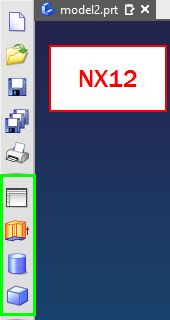
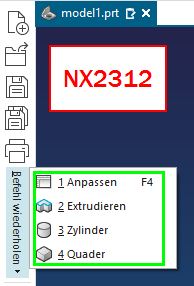
Hallo zusammen, kann man für "Befehl wiederholen" das Verhalten aus NX12 wiederherstellen? In NX12 werden die Befehle direkt dargestellt - man sieht auf einem Blick, was man auswählen kann. In NX2312 werden die Befehle in einem Dropdown Menü angeboten, was man erst aufklappen muss, um die letzten 10 Befehle sehen zu können? Ich habe über Anpassen schon alles mögliche durchsucht, aber nichts finden können.
Ich möchte gern auf einen Blick die letzten 10 Befehle sehen können. Danke im voraus. ------------------
J.B.  Eine Antwort auf diesen Beitrag verfassen (mit Zitat/Zitat des Beitrags) IP |
hausi
Mitglied
Beiträge: 294
Registriert: 16.12.2002
|
erstellt am: 17. Okt. 2024 10:09 <-- editieren / zitieren --> Unities abgeben: Nur für Jörg Ba. 
Hallo J.B. Hier die Lösung von GTAC 1. In NX, perform 10 commands, or atleast as many of the commands (plus one
more), as should appear in the border bar.
For example, if the last 5 commands are to appear individually in the border
bar, perform 6 commands.
If the last 9 commands are to appear individually in the border bar, perform
10 commands.
2. In the Menu, select 'Tools-->Customize'.
3. Select the 'Commands' tab.
4. Expand 'Menu' and expand 'Tools'.
5. Under 'Tools', highlight 'Repeat Command'.
The last commands performed will appear on the right, up to number 10.
6. "Drag & drop" the commands into the desired border bar starting with the
top listed command (command 2).
Make sure to "drag & drop" and place the commands in numerical order.
If you wish for the last 5 commands to always be in the border bar, "drag &
drop" command numbers 2-6.
If you wish for the last 9 commands to always be in the border bar, "drag &
drop" command numbers 2-10.
7. Close the Customize dialog.
The icons will now cycle with each new command performed to show the last
commands performed.
Please note that icons will remain hidden if there are not enough commands to
populate them all. When additional commands are used, the icons will reappear
and shift down as the new commands are added.
Also, the 'Repeat Command' list is cleared when changing applications, closing
a part, and when entering or exiting the Sketch Task Environment.
Gruss
hausi
Eine Antwort auf diesen Beitrag verfassen (mit Zitat/Zitat des Beitrags) IP |
Jörg Ba.
Mitglied
Konstrukteur
Beiträge: 235
Registriert: 23.04.2003 NX12
NX2312
|
erstellt am: 17. Okt. 2024 10:31 <-- editieren / zitieren --> Unities abgeben:
|
| Anzeige.:
Anzeige: (Infos zum Werbeplatz >>)
 |

 Foren auf CAD.de


 |
|