| | |
 | Gut zu wissen: Hilfreiche Tipps und Tricks aus der Praxis prägnant, und auf den Punkt gebracht für Creo |
| | |
 | BOM Assistant für Stücklistenerstellung , eine App
|
|
Autor
|
Thema: Edit Attributes in Structure list (1841 / mal gelesen)
|
Andylau Mitglied

 Beiträge: 56 Registriert: 07.06.2021
|
erstellt am: 18. Jun. 2021 17:35 <-- editieren / zitieren --> Unities abgeben:         
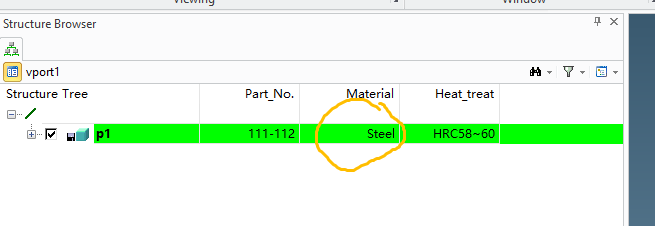
Hi Everybody, I'm a beginer of lisp. I modified a lisp to show self defined attributes(which can be input from toolbox "BOM Attr") in structure list. And I wanted to eidt some attributes in structure list. For example, edit material at material column. The material could be input by something new or be choosen from drop-down menu. I knew I should add a function at ":edit-fnc" But I didn't know how to transfer the value to object. (oli::sd-create-column-definition :Material :title "Material" :alignment :right :display-fnc 'browser-display-Material :edit-fnc 'edit-attr-Material ;; Write a func (edit-attr-Material) ) Thanks a lot! Andy
Eine Antwort auf diesen Beitrag verfassen (mit Zitat/Zitat des Beitrags) IP |
der_Wolfgang Moderator Tastenhauer
     

 Beiträge: 2421 Registriert: 3.20. ● PE60+80+90@home ● W10 Pro Bld19045.6466 ● Drafting V17~V20.6@job ● Modeling V17~V20.7.2@job ● Windchill 12.1.2.8@job ● UWGM Client 13.1.0.1@job ● Taschenrechner ● brain 6.3 ● Stift+Zettel V8.42
|
erstellt am: 18. Jun. 2021 23:51 <-- editieren / zitieren --> Unities abgeben:          Nur für Andylau
|
Andylau Mitglied

 Beiträge: 56 Registriert: 07.06.2021
|
erstellt am: 19. Jun. 2021 03:50 <-- editieren / zitieren --> Unities abgeben:         
|
der_Wolfgang Moderator Tastenhauer
     

 Beiträge: 2421 Registriert: 3.20. ● PE60+80+90@home ● W10 Pro Bld19045.6466 ● Drafting V17~V20.6@job ● Modeling V17~V20.7.2@job ● Windchill 12.1.2.8@job ● UWGM Client 13.1.0.1@job ● Taschenrechner ● brain 6.3 ● Stift+Zettel V8.42
|
erstellt am: 19. Jun. 2021 14:49 <-- editieren / zitieren --> Unities abgeben:          Nur für Andylau
Zitat: Original erstellt von Andylau: Thanks for you help! Now it works.
Glad to hear it's working and I was able to help for that INLINE Editing in the browser table column you can not provide any kind of (selfmade, additional) user interface, e.g. like a drop down list. What you can do is to check whether the entered value is valid or not and reject it. When you reject the value (e.g. cross checking against a list of valid entries) the edit function should return NIL .. if it's fine T. Except the object instance name inline editing it isn't very common. _____________________________________ BTW for english speaking people there is the international CoCreate Forum : https://cocreateusers.org/forum/ , but we are aware that the traffic over there is much less compared to cad.de. ------------------ ● Firefox ESR ● Java Forum Stuttgart JUGS ● OSD Hilfeseite (de) / help page (en) ● NotePad++ ● BuFDi ● Eine Antwort auf diesen Beitrag verfassen (mit Zitat/Zitat des Beitrags) IP |

Andylau Mitglied

 Beiträge: 56 Registriert: 07.06.2021
|
erstellt am: 21. Jun. 2021 03:59 <-- editieren / zitieren --> Unities abgeben:         
Thanks for your further information. osd.cad.de is the most active((No "one of")) forum for osd. For a Chinese like me, I Usually use Chrome to translate Germany to English. Then I can browse most of the post. BR Eine Antwort auf diesen Beitrag verfassen (mit Zitat/Zitat des Beitrags) IP |
yajoro9447 Mitglied engener
 Beiträge: 4 Registriert: 04.03.2026
|
erstellt am: 05. Mrz. 2026 10:02 <-- editieren / zitieren --> Unities abgeben:          Nur für Andylau
Hello Andy and Wolfgang, Thank you for sharing the solution. It helped me understand how the :edit-fnc works for editing attributes in the structure list. I have another question: how can we write or customize the tree structure in the Structure Browser? Is there any LISP command or API function that allows creating or modifying the tree (nodes/levels) similar to how the columns are defined? If there is an example or documentation for creating a custom tree in the browser, I would really appreciate it. Thank you! ------------------ tuan Eine Antwort auf diesen Beitrag verfassen (mit Zitat/Zitat des Beitrags) IP |
der_Wolfgang Moderator Tastenhauer
     

 Beiträge: 2421 Registriert: 3.20. ● PE60+80+90@home ● W10 Pro Bld19045.6466 ● Drafting V17~V20.6@job ● Modeling V17~V20.7.2@job ● Windchill 12.1.2.8@job ● UWGM Client 13.1.0.1@job ● Taschenrechner ● brain 6.3 ● Stift+Zettel V8.42
|
erstellt am: 05. Mrz. 2026 18:58 <-- editieren / zitieren --> Unities abgeben:          Nur für Andylau
Zitat: Original erstellt von yajoro9447: I have another question: how can we write or customize the tree structure in the Structure Browser? Is there any LISP command or API function that allows creating or modifying the tree (nodes/levels) similar to how the columns are defined?If there is an example or documentation for creating a custom tree in the browser
yes + yes + yes... The dummy browser example is still available: https://support.ptc.com/help/creo_elements_direct/r20.8.0.0/advanced_documentation/integration_kit/examples/gbrowser_test_lsp.html In general you should read: https://support.ptc.com/help/creo_elements_direct/r20.8.0.0/advanced_documentation/integration_kit/reference/gbrowser.html All the relevant functions are explained in there. Those are the major functions:
- sd-create-browser-tree -- the tree holds the data
- sd-create-graphical-browser -- the browser is just the viewable represantation of the tree
The graphical-browser is normally only created once, same as the tree. But tree contents is rebuild from time to time (e.g. when your data Strucure is changing) For a first exercise I would skip all the 'sd-browser-define-table' stuff in the example. And skip drag'n drop in the beginning. Have just a browser tree.. fill it using sd-create-BrowserNode function, add very few data to those to have something to feed your first interrogator's * Town ** MainStreet *** building-01 *** building-02 *** building-03a *** building-03b ** Station-Street *** building-02 *** building-04a *** building-06b ** Cemetry-Street *** building-01 *** building-02 *** garden **** cell A **** cell B **** cell C now you can already fiddle with icons (means real images) for those nodes: 🏙️ -- 🛣️ -- 🏡 🏚️ -- ☘️ -- 🪦 Later on good to know as well are:
- sd-query-browser
- sd-browser-exec-cmd
- for those you need the browser's name: sd-list-graphical-browsers
------------------ ● Firefox ESR ● Java Forum Stuttgart JUGS ● OSD Hilfeseite (de) / help page (en) ● NotePad++ ● BuFDi ● Eine Antwort auf diesen Beitrag verfassen (mit Zitat/Zitat des Beitrags) IP |

| |
lenevay507 Mitglied DESIGN
 Beiträge: 1 Registriert: 01.04.2026
|
erstellt am: 02. Apr. 2026 15:30 <-- editieren / zitieren --> Unities abgeben:          Nur für Andylau
|