Besten Dank für die Anregungen und Entschuldigung das ich jetzt erst Antworte. der erste Beitrag hat mir leider nicht geholfen, habe aber eine Lösung gefunden:
Reaction:
' 1. Zugriff auf das Hauptprodukt (xx__TEST__xxxxxxx)
Dim rootProd As Product
Set rootProd = CATIA.ActiveDocument.Product
' 2. Suche nach dem Part "xx_TESTING2" innerhalb der Struktur
Dim targetPartInstance As Product
On Error Resume Next
Set targetPartInstance = rootProd.Products.Item("xx_TESTING2.1")
On Error GoTo 0
If Not targetPartInstance Is Nothing Then
' 3. Zugriff auf das Part-Objekt
Dim oPart As Part
On Error Resume Next
Set oPart = targetPartInstance.ReferenceProduct.Parent.Part
On Error GoTo 0
If Not oPart Is Nothing Then
Dim oBody As Body
' 4. Body suchen (einer der beiden Zielnamen)
On Error Resume Next
Set oBody = oPart.Bodies.Item("UMBENENNEN001")
If oBody Is Nothing Then
Set oBody = oPart.Bodies.Item("UMBENENNEN002")
End If
On Error GoTo 0
If Not oBody Is Nothing Then
' 5. Toggle Name + dazu passende Farbe setzen
If oBody.Name = "UMBENENNEN001" Then
oBody.Name = "UMBENENNEN002"
Call SetBodyColor(oPart, oBody, 255, 255, 0, 0) ' Gelb
Else
oBody.Name = "UMBENENNEN001"
Call SetBodyColor(oPart, oBody, 0, 0, 255, 0) ' Blau
End If
Else
' Optional: MsgBox "Kein passender Body gefunden."
End If
Else
' Optional: MsgBox "Part-Objekt konnte nicht ermittelt werden."
End If
Else
' Optional: MsgBox "Instanz 'xx_TESTING2.1' nicht gefunden."
End If
End Sub
'-------------------------------------------------------------
' Hilfsroutine: Farbe für einen Body setzen (RGB + Transparenz)
' transparency: 0 = deckend, 255 = komplett transparent
'-------------------------------------------------------------
Sub SetBodyColor(oPart As Part, oBody As Body, ByVal R As Integer, ByVal G As Integer, ByVal B As Integer, ByVal transparency As Integer)
If oPart Is Nothing Then Exit Sub
If oBody Is Nothing Then Exit Sub
Dim sel As Selection
Set sel = oPart.Parent.Selection
sel.Clear
sel.Add oBody
Dim visProps As VisPropertySet
Set visProps = sel.VisProperties
' Farbe setzen
visProps.SetRealColor R, G, B, transparency
' Optionales Verhalten (sichtbar erzwingen, etc.)
' visProps.SetShow 1
sel.Clear
End Sub
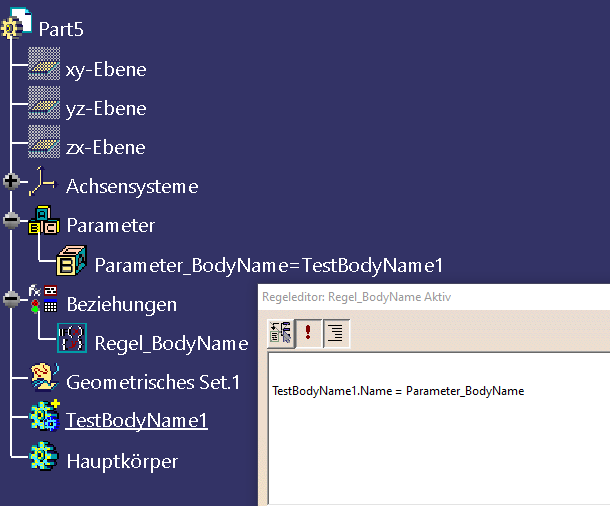
werde es morgen nochmal mit der Rule probieren.
Besten Dank, gebe dann noch mal Bescheid.
Eine Antwort auf diesen Beitrag verfassen (mit Zitat/Zitat des Beitrags) IP

 Foren auf CAD.de


 |
|